Traditionelle Umschrift, Textverarbeitung und XML
The common transliteration, word processors and XML
Üblicherweise wird für Editionen wie für andere Arbeiten ein Textverarbeitungsprogramm verwendet. Das hat den Vorteil, dass der Nutzer an seine Handhabung gewöhnt ist und sich wenig Gedanken über technische Fragen machen muss.
Nachteilig ist zum einen, dass sich die erzeugten Texte nicht ohne das jeweilige Programm lesen lassen, und zum anderen, dass die Bedeutung und Funktion von Teilen des Textes nicht eindeutig erkennbar ist, obwohl sie vielleicht sogar markiert wurde, etwa durch Kursivierung.
Normally a wordprocessor is used to write text editions as for other manuscripts. The advantage is, that the editor is used to its functions and does not have to bother about technical details.
The disadvantage is, that the created texts not only need the proprietary wordprocessor to be read, but also that the meaning and function of text sections is not entirely clear, although they might be marked in a was, e.g by italics. At least not to a machine.
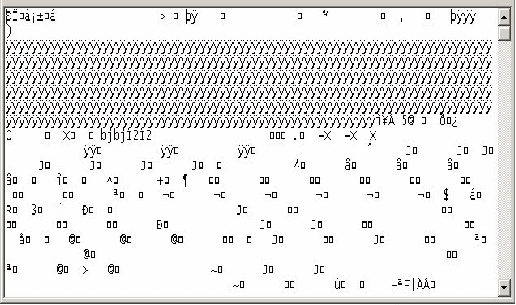
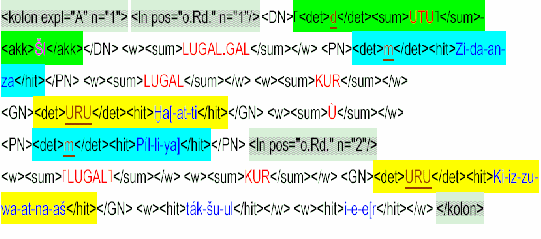
Ohne das Textverarbeitungsprogramm sähe ein Text aus wie oben. Das kann vermieden werden, indem man nur noch Zeichen verwendet, die weltweit in den Computersystemen definiert sind, und mit einem simplen Editor geschrieben werden können.
Dann gäbe es zur zur Gliederung eines Textes aber nur noch Tabulator und Absatz. Durch XML (extensible markup language), das noch größere Freiheiten erlaubt als das milliardenfach verwendete HTML der Webseiten, lässt sich das beheben: Je nach Zweck lassen sich Teile eines Textes markieren (oben rechts), nicht nur graphisch, sondern auch inhaltlich.
Aber möchten Sie alles in XML tippen? Mit Staroffice, Openoffice, Neooffice und Libreoffice, die auf dem ODF (Open Document Format) aufbauen, erübrigt sich das.
Without the wordprocessor the text might look like above on the left (think back what was there in computers 30 years ago and imagine what will be in 30 years). This can be avoided, if one only uses characters that are defined on all computer sysems of the world and can be written with simple editors.
With the simple editor there would be only tabs and paragraphs to structure a text. But XML (extensible markup language), similar to the widespread HTML of billions of websites, offers a marvellous way to markup not only the look, but also the content of a text.
But would you like to type everything in XML? With Staroffice, Openoffice, Neooffice or Libreoffice, which are based on ODF (Open Document Format), it is unnecessary to do so!
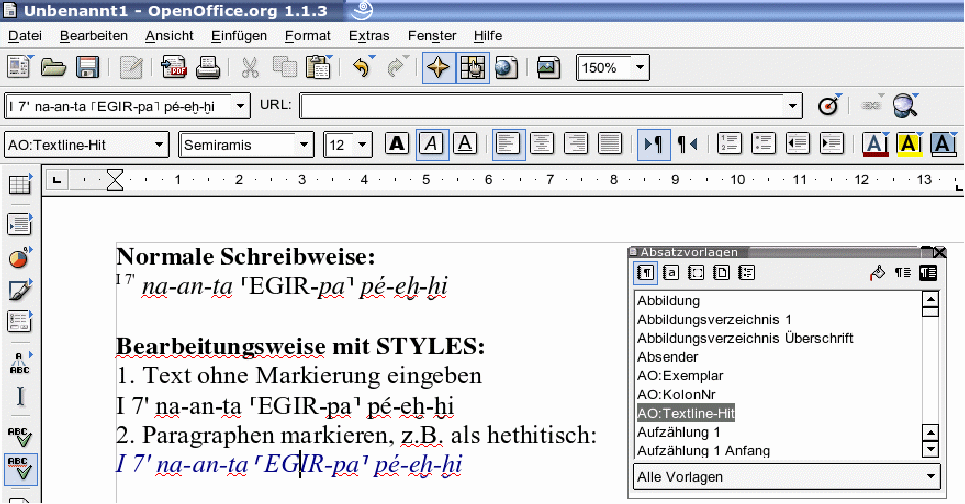
Eine gewöhnliche Textumschrift enthält bereits zahlreiche Markierungen, die aber üblicherweise nicht eindeutig gesetzt werden. Meist werden selbst Überschriften durch Vergrößerung der Schrift, das Anklicken von Fett und Unterstrichen formatiert. All das ließe sich durch einfaches Auswählen des Stils „Überschrift“ erreichen
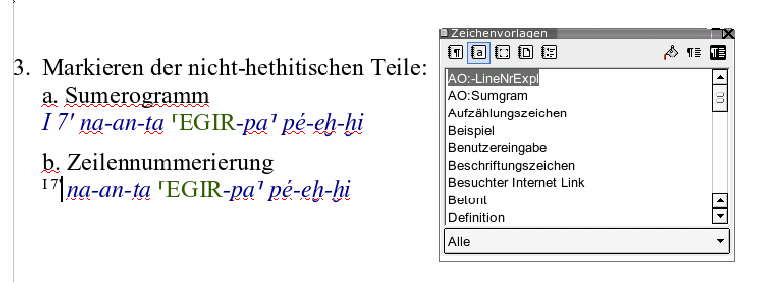
Im Beispiel oben werden Hochstellung und Kursivierung versus „Kapitälchen“ verwendet, um die Zeilennummer, hethitischen Text und Logogramm zu differenzieren. An anderen Stellen eines Textes können Kursivierungen und Hochstellungen ganz andere Funktionen haben.
So wie der Stil „Überschrift“ es einem Programm ermöglicht, z.B. ein Inhaltsverzeichnis automatisch zu erstellen, können bei der Verwendung von Stilen auch verschiedenartige Kursivierungen ausgewertet werden.
Geht man von einer völlig unmarkiert eingegebenen Zeile aus (Text aus alten Dateien am besten mit „Format → Standardformat“ bereinigen), markiert man zunächst die Grundfunktion eines Absatzes, hier „AO:Textline-Hit“ (d.h. die ganze Textzeile bzw. der Absatz ist hethitischer Text) im Menü der Paragraphenstile ¶.
Die Farben dienen lediglich der Übersichtlichkeit!
An usual transliteration contains numerous mark-ups, which are usually used ambigiously. Even headings are mostly formated by clicking the fat and the underline buttons and increasing the size of the characters, although all this could be achieved by a simple click on the Heading style.
In the example above superscript, small caps and italics are used to distinguish line no., logogram and Hittite text. But in other passages the meaning of these formats might be quite different.
Thus it is better to use named styles that do not only show certain characteristics but tell by there names something about their content. These named styles can be processed automatically as the Headings can be used to generate the table of contents automatically.
The easiest way is to start with typing the pure characters without any style information (or clean text from old files by applying „Format → Standardformat“).
Then apply the named style which tells us about the basic function or meaning of the paragraph (in the above example it is a Hittite text marked by the paragraph style ¶ „AO:Textline-Hit“ .
The colors are used for clarity only!


 wie
mit einem Textmarker durchgeführt werden kann.
wie
mit einem Textmarker durchgeführt werden kann.